Oticon LE Adaptor review
01 May 2025
Early feedback on the OTICON Easy LE Adaptor (March 2025)
For Oticon Intent Hearing Aids
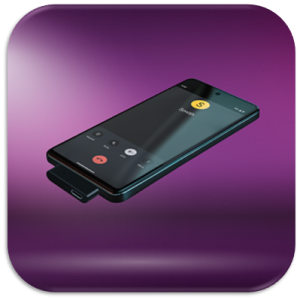
“In short, it is an excellent device 5-star rating!"
Tablets
I have connected it to two different old Samsung 10.1” Tab A tablets, one is about 8 years old (Model SM-T590) and the other is about 5 years old (Model SM-T510). Both worked well with the Oticon Intent hearing aids. The only difference I observed was the older tablet (Model SM-T590) didn’t work if you tried to use the “pass-through” charging capability whilst streaming audio. However, the newer tablet (SM-T510) worked in both standalone and pass-through charging mode.
Laptops (with NO USB-C port)
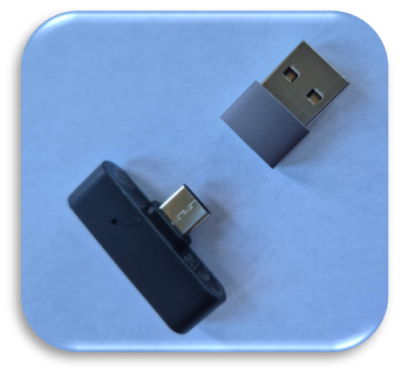
I have connected it to three old Windows laptops that did NOT have a USB-C connection, by using a “USB to USB-C adapter” (see image below). So I could connect it to a laptop which had just standard USB ports. A Dell Inspiron 3501 (Windows 11 Home 24H2), a HP 350 G2 (Windows 10 Pro 22H2) and a Microsoft Surface Book (Windows 10 Pro 22H2). All three worked well with the Oticon Intent hearing aids.
Laptops (with USB-C port)
I went to Currys and connected the Easy LE Adaptor to at least 6 different Windows 11 laptops (sub £600 price range) that all had USB-C ports e.g. HP, Lenovo, Samsung, Acer, Asus etc. They all worked well with the Oticon Intent hearing aids (basically just “Plug & Play” – Fantastic!).
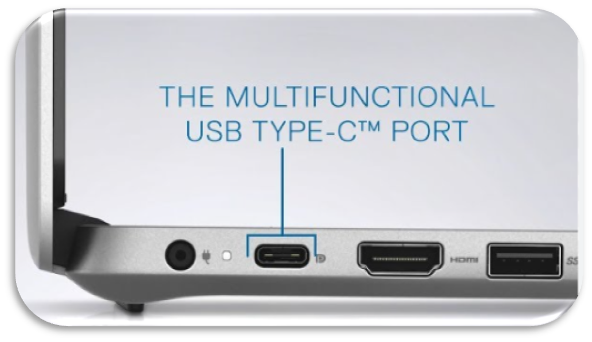
You just have to be wary of the position of the USB-C port on the laptop as the “T-Shape” Easy LE Adaptor may physically cover other ports on the device. In some cases that could be the power connection (see image below) …
Mobile Phones
Unfortunately, I don’t have any old mobile phones to test, only my Bluetooth LE Audio compatible Samsung Galaxy 24+, but I expect they will work fine (like tablets). I will try to visit Curry’s and see if I can test them, but they tend to lock them down as they are easy to steal.
Summary
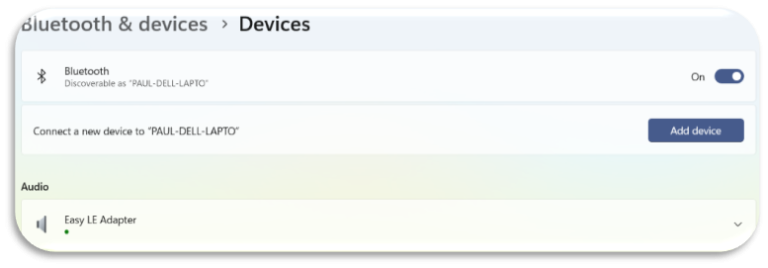
Overall, this Easy LE Adaptor is very easy to use. You only need to pair it once with your Intent 1 hearing aids and then you can simply move it between devices without having to re-pair it again. Literally it’s just “plug & play”. Plug it into any device (laptop, tablet etc) and it will automatically recognise the Easy LE Adaptor (see image below taken from my old Windows 11 laptops “Bluetooth & Device” setting) and you are good to go.
Also, you can leave your Bluetooth LE Audio compatible phone connected (in my case a Samsung Galaxy S24+) to Bluetooth and the act of plugging in or removing the Easy LE Adaptor from any device will automatically toggles the Intent hearing aids on & off from your phone, i.e. no need to manually switch the Bluetooth on and off on your phone. It automatically disconnects you hearing aids from your phone when the Easy LE Adaptor is plugged into another device, and it automatically reconnects it again when the Easy LE Adaptor is removed from the device. So, although you can’t have two devices connected to your Intent hearing aids at the same time, it at least makes it easy to switch between devices.
The only criticism I would have, is the lack of any meaningful instructions. You basically have to work it out yourself.
I will continue to test the Easy LE Adaptor, but I wouldn’t hesitate to recommend it to other Oticon Intent users. Ultimately it saves Oticon hearing aid users from having to buy expensive Bluetooth LE Audio compatible devices. So well worth the cost of the Easy LE Adaptor.
Thanks again for letting me test this exciting new device. I will provide further updates as and when I manage to test on other devices.
Follow-up (May 2025)
Following my previous feedback on laptops and tablets, I tried testing mobile phones, but Currys put a physical lock on their display phones that prevent the Easy LE Adaptor being inserted. So, this made it very difficult to test. I eventually managed to get my hands on a non-LE Audio compatible phone (Samsung Galaxy A05s – purchased about 6 months ago for £120) which had a USB-C type port.
My finding, based on this limited test, was that the Easy LE Adaptor does not support the voice call VOIP code (G-729) but does support the audio streaming codec (Samsung’s proprietary Scalable Codec).
This will be a major issue for most people who predominantly want the Easy LE Adaptor to stream voice calls directly into their hearing aids.
I have an LE Audio compatible phone (Samsung Galaxy s24+) so the Easy LE Adaptor is a great addition for my laptop and tablet to stream audio directly into my hearing aids. I don’t need it for voice calls.
I’ll keep my eye out for other phones that I can test it on to see if it performs any differently on phones from other manufacturers, but I thought it was important to give you my initial feedback on mobile phones asap.”
PT (our client at Cleckheaton)
Follow-up 2 (May 2025)
“Whilst in the Genie 2 software there was a firmware upgrade notification which mentioned it contained compatibility enhancements with the Easy LE Adaptor -(see below) – I successfully applied the upgrade but have found it has had a negative impact on the stability of the Easy LE Adaptor. Whereas before I could switch easily between my Samsung S24+ Bluetooth LE Audio connection and the Easy LE Adaptor connected to my Laptop, I now lose connection to one of the Hearing Aids i.e. it connects to only one side and I have to turn off & on the HA’s to fix the problem. Definitely a backward step.“
Read Other News Articles